Showing posts with label Facebook. Show all posts

Easy Tricks To Make Money With Facebook For Free And Earn $$$ Online

easiest-tricks-to-earn-money-on-facebook

Making money online and that too on Facebook is really fun. Facebook is a Social Networking site but you can use it to earn money easily without much labor. Almost all of us have a facebook account and we ought to spend a lot of time on facebook. Or, let me correct it. Out of total time spent online, we spend almost 90% time on facebook only. And, what do we do on Facebook? Scroll through news feed, check other's status, like and comment on photos, chat with buddies and activities like that. But, what if I say that you can use Facebook as a platform to earn money. And you will be surprised to know that there are many working ways to make money on facebook. So, if one method doesn't work for you, you can give try to another working method to make money on facebook.


How much money You can earn on facebook?

The question that how much money one can earn on facebook seems very genuine and concerning. The answer varies for person-to-person. It all depends on you. The more effort you will put in, the more money will be poured in your account. Anyhow, you can earn anything between $5-$500 and sometimes even more than that. But, making money online on facebook is not a piece of cake at all. You can't expect money to arrive at your door automatically. Of course, you need some skill, creativity and willingness to work hard in order to make money on facebook easily. So, if you possess these above mentioned things then you are ready to go through this easy guide to make money online with facebook.


1. Make Money on Facebook with Facebook Pages

use-facebook-page-to-earn-money-on-facebook


Almost all of you have basic idea of how facebook pages work. Facebook page is the platform to promote a brand, celebrity, activity, website, product etc. But, there are many facebook pages which are posting entertainment-related stuff too. A few examples are- Rajnikant v/s CID Jokes, Hansi Ke Gol Gappe, Chirkut Baba Ke Anmol Wachan. These pages are very popular with millions of like and page reach. Now, imagine that a company posts an ad of its product on one such page. The company will get exposure to thousands of potential customers. And, the motto of every advertising program is- to reach more & more people. Needless to say that companies spend a lot of money on Advertising solely. So, now imagine it for a second-
You have a facebook page with thousands of likes. You post interesting stuff for your readers. They are attached with your page. And, now you approach to advertisers and show them your page status. Certainly , advertises shall show interest to promote their product on your page. In return, they shall provide you handsome bucks. As simple as that.

But, always remember that you must have a good page with huge number of genuine likes (don't use facebook autoliker to generate fake likes) and better post reach. Only then advertiser will show interest in you. So, here are a few tips which you can use to create an awesome facebook page-

(1.) Build the page on any topic of your expertise and interest.
 
(2.) Always post unique and creative content to bind the audience.
 
(3.) Post content on regular basis to engage audience more and more.
 
(4.) Provide Freebies to people to attract them towards your page.
 
(5.) Finally, use Facebook Ad to reach more people.
 
Also, there is another way to earn money with Facebook page. You can create a popular page and then sell it to some other person. Facebook fan pages which are based on celebrities are sold at high prices as these pages get likes easily. But, before making a deal always make sure that the person is trustworthy otherwise you will loose your page without any money.


Also Check: How To Hack Android Smartphone With Best Keylogger
 

2. Make Money on Facebook with URL Shortener Service


earn-money-on-facebook-with-url-shortener-easily

Actually, URL shortener services are the easiest method to earn money on facebook. This is the simplest method to make money on facebook. All you need to do is to join any of URL Shortener service. I would like to recommend you AdFly (adf.ly), Shortest (shorte.st) and Linkbucks.

Then, find some really awesome and interesting content (it may be a post, image, video, software, podcast or anything) on Internet. The more interesting your content will be, the more chances will be there for you to earn.
 
After finding a few good sharable content, use any of the above URL Shortening service to shorten the URL of the content.
 
Now, share this link on Facebook. You can share it on your timeline, groups or pages. You can also send the link to people through online chatting. I suggest you to use an attractive description for your link so that more people can get attracted to click on your click. Also, don't spam the groups with your link otherwise admin will kick you out from group!!!
 
If your content and description is attractive then people shall certainly click on the link to know more.

And, you will be get paid for each click. As simple as that!!l!


3. Make Money on Facebook with Facebook Application


use-facebook-application-to-make-money-on-facebook

If you have ever searched for ways to make money online then certainly you have come through a few sites which pay you on the basis of your activities. You can earn money by playing games, quiz, sudoku, trivia etc on these sites. These sites also pay you for visiting various sites. Fortunately, there are some facebook applications too which can provide you mobile recharge or money on the behalf of your activities. I have searched Internet for a while and found these working Facebook App which you can use easily to earn free recharge or some real cash-

1. AppBank
 
2. LiveStock
 
3. Embeepay
 
Although, I have never tried these apps still I suggest you to give them a try. It will work for you.


4. Make Money on Facebook with your own Facebook App


create-your-own-app-to-make-money-on-facebook

If you are a programmer or a coder then you can give it a try. You can create your own facebook app using programming skill. If your app gets popular on facebook then you can monetize your app to earn money. Here, monetization means you can add Advertisement in your facebook app. Facebook shall pay you for every click on your ad. To know more about Facebook app, I suggest you to check this.


Also Check: Free Facebook Autoliker Trick to Get Likes

5. Make Money on Facebook by promoting your business


use-facebook-to-promote-business-and-earn-online

We all are aware of the capability of Facebook as a promoting tool. You can get new customer and sells easily on Facebook. I know one of my relative who works in the field of import & export of products. Let me tell you that he uses email marketing and facebook only to reach new customers. Such is the potential of Facebook. So, if you too are managing a business then Facebook can be proved as an ultimate marketing tool for you. You can easily find new customers on facebook. All you need to do is to create a facebook page of your product or service and make it popular. People shall automatically notice your work and many of them shall be turned as your customer. You can also use facebook to connect with your client in order to provide more efficient service. It will help you to get more sales. And, more sales simply mean more money. Isn't it?


A Personal Message to You

It is nice to see that you have gone through Easy tricks to make money with facebook for free and earn $$$ online. I hope that you have enjoyed the article. However, if you want me to deliver more hacking tutorials and articles then please share my post. You can use Social Sharing Widget provided at the end of every post. After all, Sharing is Caring!!!
Thank you. Have a nice day ahead!!!

Facebook Lite App For Android To Use Facebook Faster With Slow 2G Data Connection

facebook-lite-app-for-android-smartphone-to-use-facebook-faster


Facebook Lite App is an unique and praiseworthy approach of Facebook to provide faster access on poor 2G data connection. Facebook Lite App is launched by Facebook on 4th June 2015. It is launched to make facebook easily available for android users who are using quite slow 2G data connection. Currently, Facebook Lite app is available to download for Asian users only but soon in near future, it will be available for African countries too. Facebook has primarily focused on Indian, Pakistani and other Facebook users who are victim of poor Internet connection. Needless to say, I also fall in the same category. Really, Internet speed is quite poor and torturous as well in most parts of India. 3G is one good option but everyone can not afford expensive 3G data packs. This time facebook has targeted such users. After much debated Internet.org campaign, Facebook Lite App for Android is yet another opportunity for facebook to attract users on a mass base. I personally have downloaded and tested Facebook Lite App for Android and found that it was working very smoothly on my Micromax YU Yureka smartphone as well as Micromax A35 bolt with Idea 2G Data pack. Actually, Facebook Lite App for Android is the lighter and faster version of official Facebook Android app. Although, it is very easy to use Facebook Lite app in Android smartphone still here is a complete guide to use Facebook Lite App in Android.


How To Download Facebook Lite App in Android?

It is pretty much easy to download Facebook Lite app in your android smartphone. You can easily download it from Google Play Store or any other android app provider website free of cost. One of the main feature of Facebook Lite App for Android is that it's size is 435 KB which is damn too low. Anyone can easily download the .apk file with ease and install it.


How To Use Facebook Lite App?

After installation, open Facebook Lite App. If you are using it for first time then it will ask you to Log In.


log-in-with-your-faebook-account-in-facebook-lite-app-for-android

Simply use your Facebook Login credentials to Log In. One of the main feature of it is that the app automatically import all your phone contacts and sync it with your facebook account. In this way, you can easily connect with those too who are in your contact but not on facebook.


facebook-news-feed-shown-in-facebook-lite-app-for-android

The Facebook Lite App works same as official Facebook App.


facebook-menu-option-in-facebook-lite-app-for-android

You can Watch News Feed, Check Notifications, Read Messages, See Friend Requests, Access Groups and Manage Pages.


facebook-lite-app-push-notification-in-android-smartphone

It also sends notifications on your android smartphone. In short, you can perform all sort of activities with it but with a lightening speed. Like I earlier said, I myself have tested Facebook Lite App on Android smartphone with Super Slow Internet connection and it worked as miracle for me. This pretty awesome Facebook Lite App will be a treasure for Rural India Facebookers who always face slow connectivity problem. For you too, I highly recommend Facebook Lite App to access facebook faster on 2G network. It will be better if you recommend this app to all your friends. Sadly, Facebook Lite App is currently available on Android platform only. I hope that in future Facebook will find a solution to provide faster connectivity on Basic Internet Phone.


A Personal Message To You

It is nice to see that you have gone through Facebook Lite app for Android to use facebook faster on slow 2G internet connection. I hope that you have enjoyed the article. However if you want me to deliver more hacking tutorials and articles then please share my post. You can use Social Sharing Widget provided at the end of every post. After all, Sharing is Caring!!!
Thank you. Have a nice day ahead!!!

Free Facebook Autoliker (Best Method to Get Thousands of Likes for Free)

free-facebook-autoliker

Facebook Autoliker is a tool used to get free likes on Facebook status and images. Facebook Autoliker trick is a trending topic on Facebook Trick Groups and I have personally encountered many a people who were in search of a working autoliker trick. For all of them, I have researched a lot and finally came up with a solution. And the solution is- a working autoliker. Actually, if you search the keyword Free Facebook Autoliker on Google then you will come across a lot of autoliker sites which promise you to provide Free Facebook Likes. But, most of them are fake/spam/ full of annoying advertisement. So, finding a really working autoliker is not that easy at all. But, don't worry. I have found a Free Facebook Autoliker for you all. And it is- Hubliker. Hubliker is one of the best Free Facebook Autoliker which I have ever tried. You can get almost 150 likes in a single attempt on any status/image using Hubliker. The most important thing is that Hubliker is ad-free and it is not a scam. It works very fine. So, here is a step-by-step tutorial on Free Facebook Autoliker i.e. Hubliker.  

Step 1 

best-free-facebook-autoliker-hubliker
  
Open your web browser and visit Hubliker. 
 
Step 2  

facebook-settings-for-autoliker

Before using Autoliker, you need to make some changes in your Facebook Settings. To do so, open Facebook and go to Settings.

Also Check: How To Hack Websites on Your Android Smartphone Easily
 
Step 3 

In Settings, click on Followers. Now, In Who Can Follow Me tab change the option to Everybody

18-years-privacy-setting-facebook-autoliker

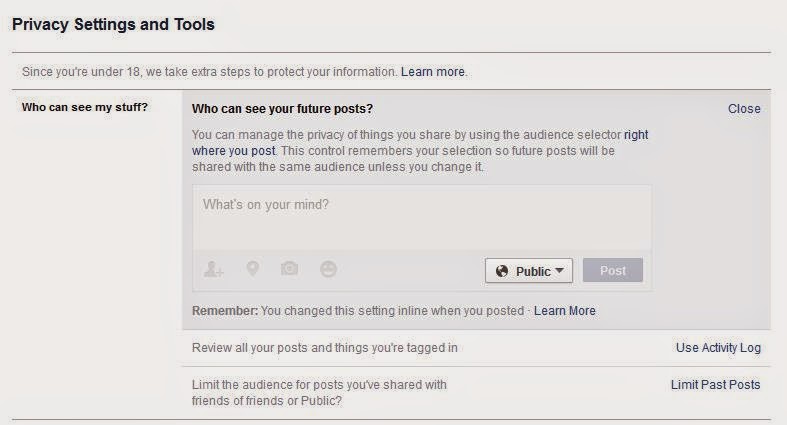
NOTE:- If your age is less than 18 years then you will be unable to see Followers option in your Facebook Settings page. So, firstly go to Privacy tab. In Privacy section, click on Who can see your future posts and set it to Public. Then follow the step 3.  


Step 4 

instruction-for-how-to-use-hubliker

You have almost done it. Now, open Hubliker and skip Instruction 1 as we have already done that.


Step 5 
htc-sense-token-access-hubliker-autoliker
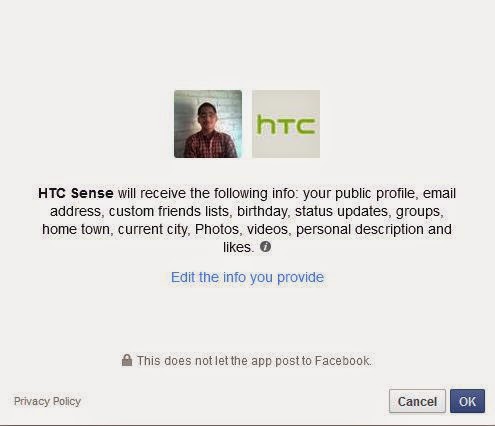
Here click on Click Me button to proceed further and provide permission to HTC Sense app.

Step 6  

permission-htc-sense

It will ask you to give permission to HTC Sense app. Simply click on OK button.

Step 7 

token-facebook-autoliker

Now, return back to Hubliker website and select Click Me button in Instruction 3. A new website will be opened in your web browser. Copy the whole address of website from your web browser. The link will be something like this- https://www.facebook.com/connect/login_success.html#access_token=CAAAACZAVC6ygBAC6fxxxxxxxxVoO1z12mT6aq4OMyQ8VVgZATVOpk7Ve0yFCNMq1qaVOKQgwGTkolZB6kyRpoJGH4ir6qBLRVhwkGDxDjzb4o2eE9ZCBIW3aLxxxxxkiK6fEhrRDQIY0QEXZBcAzT5lIoZA4VFL4zxNBg1ALskz0EnxLL7ZAoBPJmFYLm7m7xZAZB6GQZA6SW6UktJk89H&expires_in=0. If you don't get link similar to this in your browser then go to http://goo.gl/kwuy9F and copy the web address as soon as the page loads.

Also Check: WhatsApp Hacking Software WhatsApp Sniffer Really Works? 

Step 8 

Paste the copied link and select the option Yes, I agree Hubliker Terms & Services. Finally, click on Go button to proceed further.

Step 9 

Now, you will be asked to create your own account on Hubliker. Create account using username and password of your own choice. Click on Set Login button to create your own account. 

Step 10 

Well, you have finished everything now. It is time to get cool likes. Click on Photo's Like or Post Like to get likes on your image or status.

Step 11 

get-like-on-your-status-using-autoliker

Once you clicked, you will get a list of your all status or image. Select your status and total no. of likes you want to have on that status. Click on Get Like button to finish it!!!

Disadvantage of Facebook Autoliker 
It may seem quite adventurous to use Free Facebook Autoliker to gain a lot of like on facebook image or post. But, at the same time it is risky too. When I firstly used the Free Facebook Autoliker, it resulted in Ban of My Facebook Account. So, be careful while using Free Facebook Autoliker. Actually there is a working mechanism of Facebook Autoliker which we need to understand. Suppose, A is a person who uses Facebook Autoliker to get likes. Then another person B comes to use the same facebook autoliker. Here, the autoliker tool uses the facebook account of person A to provide like to person B. So, if you reside in India and your account is used to provide like on photos of the person living in China then it will surely rise suspicion and your account will be blocked.  

How to get rid of Facebook Autoliker? 

stop-using-autoliker

If you encounter problem after using the Autoliker then here is a way to get rid of it. Open your Facebook Account. Go to Settings. Click on Apps and find HTC Sense app in the list. Once found, you simply need to Remove the app from your account. In this way, the Facebook Autoliker will stop working in your Facebook account.
Note: This tutorial on Free Facebook Autoliker is written quite some time ago. So, you may be unable to match each and every steps mentioned in this tutorial with the actual Hubliker site. However, the soul of whole procedure is quite same. It means that if you are a little bit expert then you will face no problem using this tool.

proof-of-working-autoliker
Autoliker Proof
  
A personal message to you
 
It is nice to see that you have gone through "Free Facebook Autoliker- Best Method to Get Thousands of Likes for Free" completely. I hope you have enjoyed the article. However, if you want me to deliver more interesting hacking tutorials and article then please share my post(s). You can use Social Sharing Widget provided at the end of every post. After all, Sharing is Caring!!!
Thank You. Have a nice day ahead!

Delete Your Facebook or Gmail Account Easily

delete-your-facebook-account-gmail-account-easily

Nobody can ignore the importance of Internet in modern days. Various Emailing services, Content downloading site, E-commerce site, Social Networking site and Blogs are playing a great role in people's life and they are influencing the people in far greater way. Today a general Internet user almost uses an emailing service (mostly Gmail, Yahoo Mail or Rediff Mail), a social networking site (mostly Facebook and sometimes Twitter, Skype, Pinterest or Google+), an e-commerce site (Amazon,Flipkart or Snapdeal). Some advanced user even owns a Blog or Website. But, there is one common thing among all these services which I mentioned above. Have you guessed it? If yes, then you are brilliant! If no, then let me share it. Every service needs at least an account in order to work properly. Actually we are over flooded with a variety of accounts associated with various services. And here comes the problem. Sometimes we want to delete some of these accounts but it is not easy at all to delete them. Facebook does not provide any direct option to delete the account. Similarly, it is difficult to delete the Gmail account.

So, to overcome the problem, I have found a cool solution to delete Facebook or Email account easily- Delete Your Account. "Delete Your Account" is a service which provides you the facility to delete your Facebook or Email account easily. You can also delete your Amazon, AIM, Digg, Dropbox, eBay, Facebook, Flattr, Flickr, Foursquare, FriendFeed, Google Adsense, Google Adwords, Blogger, Gmail, Orkut, Google Talk, You Tube, Hotmail, iTunes, LinkedIn, Live Journal, Monster, My Space, Orkut, Paypal, Reddit, Stumbleupon, Tumblr, Twitter, Wikipedia, Wordpress and Yahoo account using this service. Here is a step-by-step guide to delete facebook account easily.


Step 1


delete-your-account

Open your web browser and visit Delete Your Account.


Step 2


choose-alphabet-to-delete-the-account

Once opened, now you need to choose the first letter of the site from where you want to remove your account. For example, if you want to delete your Facebook account then select the alphabet F.


Step 3


sites-starting-with-F

Now, you will come across a list of all sites starting with the alphabet F like Facebook, Flattr, Flickr, Foursquare and FriendFeed. Since you need to delete the Facebook account, so select Facebook.


Step 4


how-to-delete-your-facebook-account

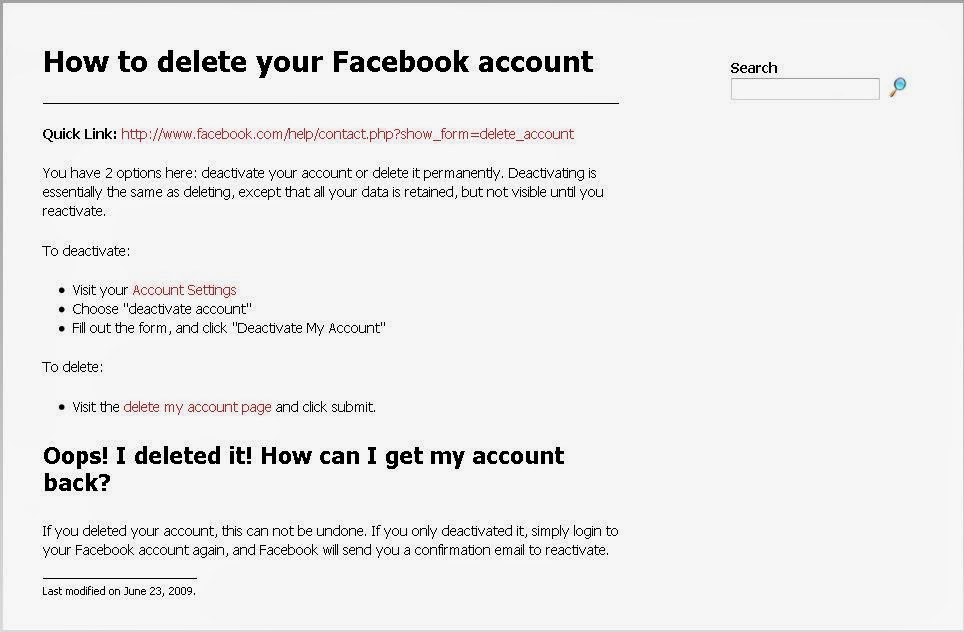
A new page will be opened now containing the guidelines and links to delete the Facebook account. Simply read the guideline and follow the link to delete your Facebook account.


A personal message to You

It is nice to see that you have gone through "Delete your Facebook or Gmail Account easily" completely. I hope you have enjoyed the article. However, if you want me to deliver more interesting hacking tutorials and article then please share my post(s). You can use Social Sharing Widget provided at the end of every post. After all, Sharing is Caring!!!Thank you. Have a nice day ahead!!!

Get Unlimited Likes for Free on Facebook

get-unlimited-for-free-on-facebook


Facebook is the largest Social Networking site and I too use it on regular basis. There I found that people are keenly interested in Facebook Hacking. But, I also came across a lot of people who were asking for Facebook Auto Liker Trick. So, I decided to work a little on it and soon I came with a solution to get Unlimited Likes and Followers on Facebook for FREE. Now, you too can get Unlimited Like on your Facebook Status and Pictures for free. How? Well, here comes a cool solution Like Fast Views.


How Like Fast Views works?

 
Like Fast Views is pretty simple to use. You can get Facebook Fanpage Likes, Facebook Website Likes, Facebook Photo Likes, Facebook Followers, Facebook Shares, Instagram Likes, Instagram Followers, MySpace Connections, Youtube Subscribers, Youtube Likes, Youtube Views, Twitter Followers, Twitter Tweets, Website Hits and Google Plus +1. So, you can get all these things at one place fore free. This makes Like Fast Views better than other similar sites. Now, let me explain how you can use Like Fast Views.


Step 1


create-account-on-like-fast-views

At first, go to Like Fast Views and register an account for free.


Step 2


login-like-fast-views

Once registered, login with your Username and Password.


Step 3

Now, visit http://likefastviews.com/coupons.php and redeem following coupons- (a.) 3752-4113-6084-6273 and (b.) 7327-4782-5767-5651. It will give you approximately 7000 coins which is enough to get a lot of Likes on Facebook.


Step 4


like-fast-views-coupons

Now, open your dashboard and click on Add Page.


Step 5


all-type-of-like-for-free

Select the type of page (Facebook Likes, Facebook Photo Likes, Facebook Share, Facebook Followers, Website, Instagram Likes, Instagram Followers, LinkedIn Share, Myspace Connections, Pinterest Followers, Pinterest Likes, Twitter Tweets, Twitter Followers, Traffic Exchange, Youtube Views, Youtube Subscribers, Youtube Share) and add your page there.


Step 6


how-to-add-your-facebook-account-with-like-fast-views

Add the URL of your page, page title, Select the coin spend on every like, Leave the rest option as default and finally click on Add Page.


Step 7


list-of-service-by-like-fast-views

Now, its time to sit back. I have already provided you coupon to get 7000 coins. So, you do not need to worry about it. People shall automatically come to your link and like them. Only your coins will be deducted on every like. But, as I said you have too much coin to spend. Although, if you want to get more coins then you can do so by liking other's page, status, pictures etc.

A personal message to You 


It is nice to see that you have gone through "Free Facebook Autoliker- Best Method to Get Thousands of Likes for Free" completely. I hope you have enjoyed the article. However, if you want me to deliver more interesting hacking tutorials and article then please share my post(s). You can use Social Sharing Widget provided at the end of every post. After all, Sharing is Caring!!!
Thank you. Have a nice day ahead!!!

Post Facebook Status in Future

post-facebook-status-in-future

Surprised? Or Are you thinking that it is a prank? Is it possible to update Facebook Status in future? Doesn't it resemble the Time Machine used in Science-Fiction movies? Well, it surely resembles the time machine but what makes it more cool is that it really works. Yes, you can update your Facebook Status in Future. And, it is not too tough procedure. It is quite easy to update your Facebook Status in Future. How?

Updating your Facebook Status in Future is not that tough job. Only you need to write a post on any topic you want and schedule it to appear in Facebook News feed at your specified time. And, to make your job easier, there are already many tool available on Internet. One such tool I found is LaterBro. It is an easy-to-use Facebook App having extremely simple graphics and working mechanism. Even a newbie can use it without facing any difficulty. Yet, here is a easy going tutorial on Updating Facebook Status in Future.


Step 1


later-bro-tutorial

Open your web browser and visit LaterBro.


Step 2


login-later-bro

Here you will get option to login with either your Facebook or Twitter account. Since you want to update your Facebook Status in Future so login with your Facebook account.


Step 3


permission-to-later-bro-app

If you are using LaterBro for first time then it will ask you to provide permission to post on Facebook in behalf of you. Simply, give permission to the app.


Step 4


type-post-in-later-bro

Once login with your Facebook account, you will come across your dashboard. Here, type in your post which you want to share.


Step 5


set-date-time-later-bro

Now, set the Date and Time as per your choice. Your post will appear in Facebook news Feed at the time chosen by you.


Step 6


option-later-bro

Select the check box to post it on Facebook. You can also modify the option that whether your post will be repeated or not.


Step 7


schedule-post-on-later-bro

At last, simply click on Schedule option and your post will be automatically send into future!

Only drawback of LaterBro is that you can only use 140 characters to share your idea. You can also tweet in future using LaterBro.

A personal message to You

 
It is nice to see that you have gone through "Post Facebook Status in Future" completely. I hope you have enjoyed the article. However, if you want me to deliver more interesting hacking tutorials and article then please share my post(s). You can use Social Sharing Widget provided at the end of every post. After all, Sharing is Caring!!!
Thank you. Have a nice day ahead!!!